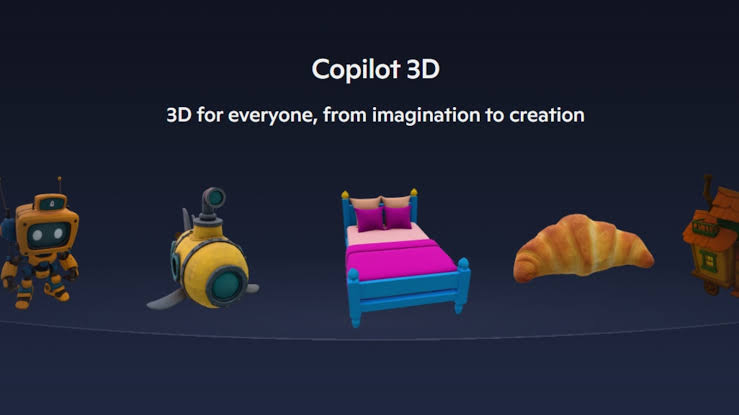

Microsoft has today launched Copilot 3D, a state-of-the-art AI tool engineered to convert ordinary 2D photos into detailed 3D models. This innovation is freely accessible to selected users via Copilot Labs, marking a significant leap in AI-powered creative technology. Whether you're a designe...
Microsoft has today launched Copilot 3D, a state-of-the-art AI tool engineered to convert ordinary 2D photos into detailed 3D models. This innovation is freely accessible to selected users via Copilot Labs, marking a significant leap in AI-powered creative technology. Whether you're a designer, educator, artist, or simply curious, Copilot 3D promises to democratize 3D model creation and accelerate digital content workflows, making complex tasks fast and intuitive.
Key Highlights
-
Copilot 3D brings transformative capabilities for digital creators:
-
Converts standard photos (JPG/PNG, up to 10MB) into exportable 3D models.
-
Models are generated in GLB format, compatible with mainstream design tools, animation software, and game engines.
-
Ideal for visualizing concepts, rapid prototyping, experimenting with ideas, and hands-on learning without conventional 3D software.
-
Accessible via Copilot's web interface for users signed in with a Microsoft or Google account.
How It Works
Users navigate to copilot.com on a desktop browser—mobile browsers are not recommended for optimal results.
-
After signing in, they select Copilot Labs in the sidebar and click ‘Try now’ under Copilot 3D.
-
Photos must be crisp and preferably have a clear separation between subject and background.
-
Upon upload, Copilot 3D processes the image—within seconds to a minute—producing a ready-to-export 3D model.
-
3D creations are saved to the user’s My Creations page, available for download for 28 days.
Use Cases and Compatibility
The tool shines when used for objects with defined boundaries; furniture, tools, fruits, and everyday items offer impressive results.
Models can be exported for use in Augmented Reality (AR), Virtual Reality (VR), video game engines, and 3D printing projects.
All outputs are in the versatile GLB format, which can be converted further for use in industry-standard applications like Blender.
Limitations and Best Practices
Currently, Copilot 3D struggles with complex subjects such as animals or humans. For instance, attempts to model pets or celebrities yielded bizarre or denied results.
Users must adhere to content guidelines: upload only images they own and avoid photos showing identifiable individuals or violating copyrights.
Microsoft emphasizes that uploaded images won’t be used for AI training and will enforce policies against prohibited content or copyright infringement.
Additional Features
No option yet for generating 3D models from text prompts—creation relies solely on source images.
Models are stored for 28 days, ensuring ample time for edits and experimentation.
The service is part of Copilot Labs but available to all users globally, not just Copilot Pro subscribers.
What Sets Copilot 3D Apart
Microsoft’s effort to bolster creative accessibility stands out by simplifying what was once a technically demanding process. This latest foray echoes earlier but now-defunct initiatives like Paint 3D and Remix3D portal, but sets a new benchmark by direct embedding within Copilot’s ecosystem. Thanks to integration with GPT-5, even more intelligent conversions and creative support are probable in the near future.
Final Word
Copilot 3D arrives at a moment when both professionals and hobbyists crave faster, easier pathways to digital creation. By empowering anyone to generate vivid, three-dimensional representations from everyday pictures, Microsoft has again raised the bar for AI-driven productivity and creativity.
Source: indianexpress.com, windowscentral.com, thurrott.com, theverge.com, dailyexcelsior.com, newsbytesapp.com